
Integrations
Chat Widget
Embed your AI agent directly into any website with a single copy-paste snippet. The Meebly dashboard generates complete, ready-to-use code with secure authentication, custom styling, and a collapsible floating button option.
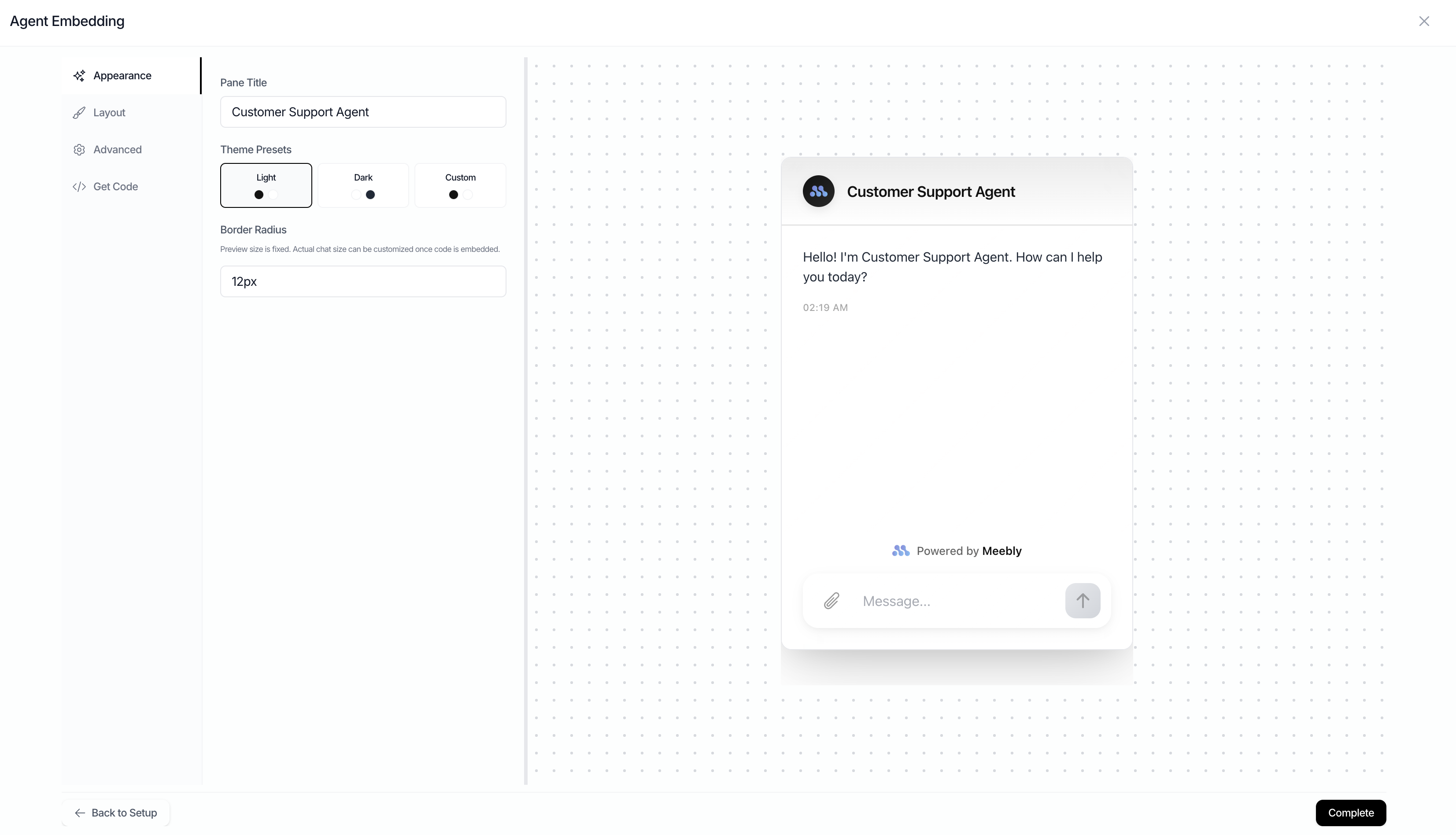
Quick Start: Navigate to your agent in the Meebly dashboard → Click "Widget Embed" → Generate a token → Customize styling → Copy the generated iframe code → Paste into your HTML. That's it!
How It Works
When you create an embed token in the dashboard, Meebly generates:
- Secure iframe URL with embedded authentication
- Encryption key for backend token security (if needed)
- Complete HTML code ready to paste into your website
- Optional features like Screen Observer and tool redirects
Dashboard Flow
1
Configure Token Settings
- • Set expiration period (1-365 days)
- • Optional domain restrictions (e.g., *.yourdomain.com)
- • Click "Generate Token"
2
Customize Appearance
- • Choose theme (Light, Dark, or Custom colors)
- • Set border radius and layout options
- • Toggle header visibility and collapsible mode
- • Live preview updates as you customize
3
Configure Advanced Options
- • Enable Customer ID tracking (optional)
- • Add backend authentication (encrypted or URL param)
- • Include Screen Observer helper code
4
Copy & Paste
- • Click "Copy Code" to get complete embed code
- • Paste into your HTML where you want the chat
- • No additional configuration needed
Embed Code
Here's what the dashboard generates for a collapsible floating widget:
html
<!-- Meebly Agent Embed Code -->
<iframe
  id="meebly-agent"
  src="https://meebly.ai/embed/agent/agent_abc123?token=emb_xyz789&primaryColor=%23121212&borderColor=%23E5E7EB&rounded=12px&height=600&showHeader=true&title=Support%20Agent&backgroundColor=%23ffffff&collapsible=true&showTimeline=true"
  style="position: fixed; bottom: 20px; right: 20px; width: 60px; height: 60px; border: none; border-radius: 50%;"
></iframe>

<script>
window.addEventListener('message', (event) => {
  const iframe = document.getElementById('meebly-agent');
  if (!iframe) return;

  // Resize the iframe when the collapsible widget is opened or closed
  if (event.data.type === 'MEEBLY_WIDGET_TOGGLE') {
    if (event.data.isExpanded) {
      // Open to full chat size
      iframe.style.cssText = 'position: fixed; bottom: 20px; right: 20px; width: 400px; height: 600px; border: none;';
    } else {
      // Shrink back to the circular button
      iframe.style.cssText = 'position: fixed; bottom: 20px; right: 20px; width: 60px; height: 60px; border: none; border-radius: 50%;';
    }
  }

  // Redirect the page when an agent tool returns a success URL
  if (event.data.type === 'MEEBLY_SUCCESS_URL') {
    window.location.href = event.data.url;
  }
});
</script>

<!-- Screen Observer (Optional) - Let your agent see what users are viewing
     Learn more: https://meebly.ai/docs (search for "Screen Observer")
<script>
function updateMeeblyScreen(state) {
  const iframe = document.getElementById('meebly-agent');
  if (!iframe?.contentWindow) return;
  iframe.contentWindow.postMessage({
    type: 'MEEBLY_SCREEN_STATE',
    screenState: { ...state, timestamp: new Date().toISOString() }
  }, '*');
}

// Call when users navigate
updateMeeblyScreen({
  route: window.location.pathname,
  entities: { /* your app data here */ }
});
</script>
-->
Non-collapsible mode: When collapsible is disabled the dashboard generates a standard inline iframe using your configured width and height (e.g.
width="400" height="600" style="border: none;") instead of the fixed-position styles above. The MEEBLY_WIDGET_TOGGLE handler is omitted from the generated code entirely.URL Parameters
The iframe URL includes these parameters (automatically set by the dashboard):
| Parameter | Description |
|---|---|
token | Secure embed token for authentication |
primaryColor | Main color for buttons and accents |
backgroundColor | Chat pane background color |
borderColor | Border color for chat elements |
rounded | Border radius (e.g., "12px") |
showHeader | Show/hide chat title bar |
title | Chat pane title text |
welcomeMessage | Optional - Custom first message shown by the agent. Defaults to Hello! I'm [title]. How can I help you today? |
customInstructions | Optional - Extra context injected into the agent's system prompt at runtime (e.g. the current user's plan, role, or any other session-specific information) |
collapsible | Show as floating button (expandable on click) |
initialStateCollapsed | Only applies when collapsible=true — whether the widget loads as a button (true) or opens immediately (false). Defaults to true. |
showTimeline | Show/hide the agent thinking & tool-call timeline panel |
customerId | Optional - Your user identifier for tracking |
encryptedBackendToken | Optional - Encrypted user JWT for backend API calls |
backendJwtToken | Optional - Plain JWT (less secure, use short-lived tokens) |
Event Handlers
The generated embed code includes a single window.addEventListener that handles all widget events. You can extend it with additional cases as needed:
javascript
window.addEventListener('message', (event) => {
  const iframe = document.getElementById('meebly-agent');
  if (!iframe) return;

  // Resize the iframe when the collapsible widget opens or closes
  if (event.data.type === 'MEEBLY_WIDGET_TOGGLE') {
    if (event.data.isExpanded) {
      // Open to full chat size
      iframe.style.cssText = 'position: fixed; bottom: 20px; right: 20px; width: 400px; height: 600px; border: none;';
    } else {
      // Shrink back to the circular button
      iframe.style.cssText = 'position: fixed; bottom: 20px; right: 20px; width: 60px; height: 60px; border: none; border-radius: 50%;';
    }
  }

  // Redirect the page when an agent tool returns a success URL
  if (event.data.type === 'MEEBLY_SUCCESS_URL') {
    window.location.href = event.data.url;

    // Or open in new tab:
    // window.open(event.data.url, '_blank');
  }
});
Backend Token Encryption
If your agent needs to call your backend APIs with user-specific authentication:
javascript
// Install: npm install crypto-js
const CryptoJS = require('crypto-js');

// Encryption key provided by Meebly dashboard when you generate embed token
const encryptionKey = 'your-encryption-key-from-dashboard';

// Your user's backend JWT token
const userBackendToken = 'user-jwt-token';

// Encrypt the token
const encryptedToken = CryptoJS.AES.encrypt(
  userBackendToken,
  encryptionKey
).toString();

// Replace YOUR_ENCRYPTED_BACKEND_TOKEN_HERE in your iframe URL
console.log('Encrypted token:', encryptedToken);

// Example: Dynamic iframe URL generation
const iframeUrl = `https://meebly.ai/embed/agent/agent_abc123?token=emb_xyz&encryptedBackendToken=${encodeURIComponent(encryptedToken)}&customerId=user_123`;
Security Best Practices:
- • Use encrypted backend tokens (recommended) over URL parameters
- • If using URL params, use short-lived tokens (15-30 minutes max)
- • Restrict embed token domains in dashboard settings
- • Store encryption keys securely (never in client code)
Complete Example
html
<!DOCTYPE html>
<html>
<head>
  <title>My App with AI Support</title>
</head>
<body>
  <h1>Welcome to My App</h1>

  <!-- Meebly Agent Embed — collapsible floating widget -->
  <iframe
    id="meebly-agent"
    src="https://meebly.ai/embed/agent/agent_abc123?token=emb_xyz789&primaryColor=%23121212&borderColor=%23E5E7EB&rounded=12px&height=600&showHeader=true&title=Support%20Agent&backgroundColor=%23ffffff&collapsible=true&showTimeline=true"
    style="position: fixed; bottom: 20px; right: 20px; width: 60px; height: 60px; border: none; border-radius: 50%;"
  ></iframe>

  <script>
    window.addEventListener('message', (event) => {
      const iframe = document.getElementById('meebly-agent');
      if (!iframe) return;

      // Resize the iframe when the collapsible widget is opened or closed
      if (event.data.type === 'MEEBLY_WIDGET_TOGGLE') {
        if (event.data.isExpanded) {
          // Open to full chat size
          iframe.style.cssText = 'position: fixed; bottom: 20px; right: 20px; width: 400px; height: 600px; border: none;';
        } else {
          // Shrink back to the circular button
          iframe.style.cssText = 'position: fixed; bottom: 20px; right: 20px; width: 60px; height: 60px; border: none; border-radius: 50%;';
        }
      }

      // Redirect the page when an agent tool returns a success URL
      if (event.data.type === 'MEEBLY_SUCCESS_URL') {
        window.location.href = event.data.url;
      }
    });

    // Optional: Screen Observer — let your agent see what users are viewing
    function updateMeeblyScreen(state) {
      const iframe = document.getElementById('meebly-agent');
      if (!iframe?.contentWindow) return;
      iframe.contentWindow.postMessage({
        type: 'MEEBLY_SCREEN_STATE',
        screenState: { ...state, timestamp: new Date().toISOString() }
      }, '*');
    }

    // Call when users navigate
    updateMeeblyScreen({
      route: window.location.pathname,
      routeName: document.title,
      entities: {
        user: { id: '123', name: 'John' },
        // Add your app-specific context
      }
    });
  </script>
</body>
</html>Last updated: March 2026Report an issue